I use Matlab 7.10 version. In this tutorial I will share my knowledge about how to make simple program with GUI Matlab to show picture,,
Okay let’s start:
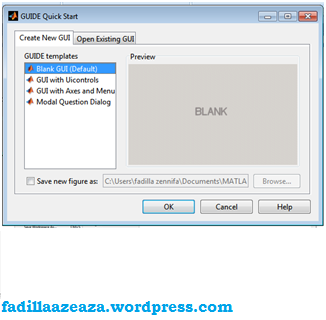
1. Klik File>New>GUI (Don’t forget to Click ENTER or click your mouse, because if u did not click that, there will be nothing happen… )

2. choose : Create New GUI -> BLANK GUI ( if this is your first time to make a new program) but if u already have Program with GUI, U can choose : Open Existing GUI -> and choose Your Program
3. Start to make Program With GUI:to make a text
1. choose this toolbar
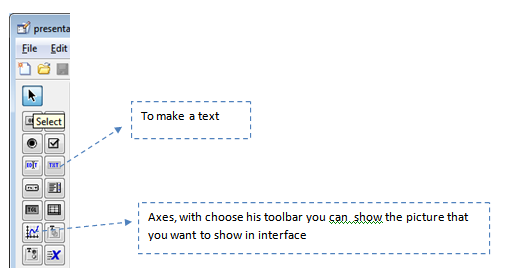
2.If u click TXT, you will see this toolbar when you do double click)

5. after finishing your design, click M-File Editor to create the syntax ,

6. type this in the last line
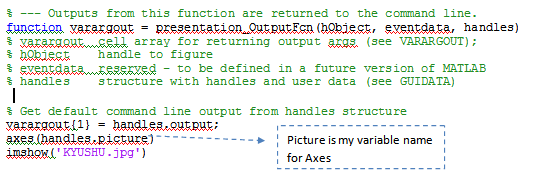
7.and RUN,,, jang jang jang jang…. Congratulation,,,
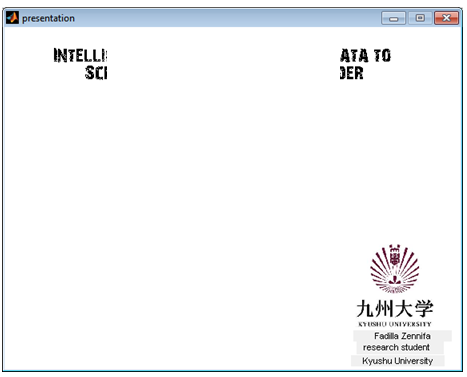
note, the kind of picture is : jpg (if u wanna use png, gif… it’s up to you,, but see what will happen…
what? do u wanna print this tutorial??
okay okay you can download this tutorial in this link How to make program with GUI Matlab
 PhD's Notes
Leave a comment